
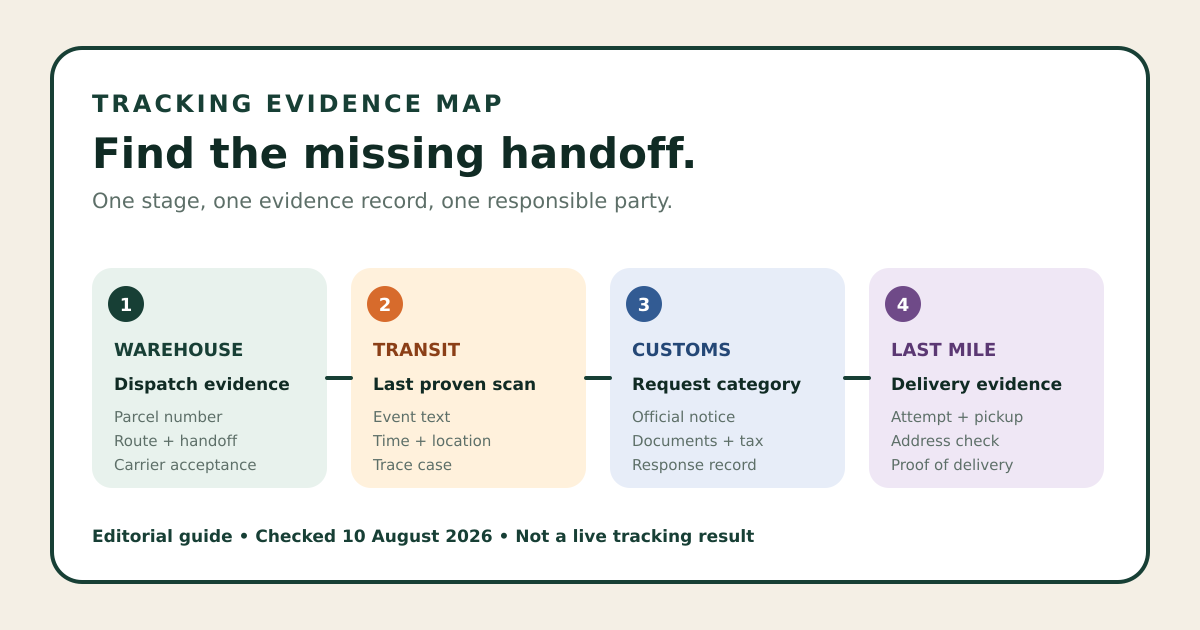
When Hubbuy tracking does not update, the first step is not to count the days: it is to determine whether the item is still an order, has reached the warehouse, or has become an international parcel. Each stage has a different responsible party and set of evidence.
Separate order status from parcel tracking
Hubbuy's public workflow shows the seller sending the item to the warehouse before inspection and international parcel preparation. Therefore, “no updates” may mean a purchase awaiting action, the seller's domestic shipment, warehouse receipt, parcel preparation, or international transport.
Open the order and note the last completed event, date, available tracking number, and stage name. Do not treat an internal status as a carrier scan. The first domestic tracking number may no longer be the number used after consolidation.
Check payment, purchase, and seller dispatch
Confirm whether payment was accepted, the purchase was made, and the seller provided domestic tracking. A label created without movement is different from a confirmed collection. Compare the time of the carrier's first event with when the order became available to the seller.
If the item page required additional information, an option, or a price confirmation, the order may be waiting for your response. Keep the message and item identifier. Another product having already reached the warehouse does not prove that this seller is late.
Record the parcel, shipping route, and active tracking number
After submitting the parcel, save its number, the shipping payment date, the selected route, the tracking number, and the first acceptance event. Check whether the tracking number changed after handover to a partner or last-mile operator.
Check the page specified for the shipping route and, once the parcel is in Brazil, see whether Correios or the stated carrier recognizes the tracking number. Generic tracking sites may rearrange messages; retain the text and time from the source responsible for the event.
A gap alone does not identify the cause
Tracking may show no new scans between facilities, during a flight, a handover, customs processing, or integration with the local operator. The absence of an event does not prove that a parcel is lost or justify a delivery-time promise. Compare the last location, the event description, and the next expected milestone for the route.
Avoid repeatedly refreshing the page without recording changes. Take a screenshot of the last event, wait the interval indicated by the route's official channel, and use that record if you need to request a check.
Read the message literally and identify who can act
“Abnormal status,” failed delivery, insufficient address, a hold, and a return are different categories. Copy the full message and code, not just the heading. Check whether the problem concerns the address, customs clearance, transport, local delivery, or an internal update.
If you receive a request for documents or payment, use only the official domain of the operator named in the order or tracking record. Do not use links received in messages without verifying their origin. Hubbuy Sheet cannot view orders or receive payments.
Send a concise evidence pack to reduce back-and-forth
- Order number and, if one exists, parcel number.
- Active tracking number and selected shipping route.
- The full last event, with its date and time zone when available.
- A masked destination address, keeping the city, state, and postal code visible for checking.
- Screenshots of the official page and a clear description of what you need to confirm.
Do not send your password, access code, or complete payment number. Ask about the next verifiable action: confirmation of the tracking number, the carrier responsible, a required document, or the opening of an inquiry.
Use the last confirmed handoff to choose the right contact channel
Before seller dispatch, address the order. Between the seller and the warehouse, investigate the domestic shipment. After international submission, use the information for the route, carrier, and local operator. If the status says delivered but you do not have the parcel, record checks with the reception desk or an authorized neighbor and the proof provided by the operator.
To avoid gaps in your next shipment, keep the history from the purchase onward and review the parcel checklist before paying for international shipping.
The distinction between order, warehouse, and parcel was checked against Hubbuy's public workflow on 9 September 2026. Timelines, routes, and contact channels vary; the carrier's event record and the active interface determine the specific case.
Hubbuy · Correios