
Submitting a parcel is the stage where you turn selected warehouse goods into a proposed shipment. It is different from ordering the products, and a submitted request is not proof that a carrier has collected the package. Before the next payment, confirm the goods, unresolved QC questions, packing choices, destination and current shipping quote. Button names can change; follow the information displayed in your current Hubbuy account.
Distinguish an order from a parcel
A product order identifies what a seller should send to the warehouse. A parcel groups selected received goods for delivery to you. One parcel may contain several orders, and the original seller’s dispatch is not the international dispatch. Keep order IDs and parcel IDs in separate fields so a support question can identify the correct stage without confusion.
The public Hubbuy workflow separates purchasing, warehouse inspection and international shipping. Use those stages to interpret the account rather than assuming that every paid transaction starts overseas delivery. A label such as submitted or pending is a state to investigate, not a universal countdown. Read any additional instruction or payment request attached to that record.
Create a ready, hold and waiting inventory
List each item intended for the shipment and mark it ready, on hold for a question, or still awaiting arrival. Include model, colour, size and quantity. Check that the selected goods in the parcel screen match this list. Similar product thumbnails can hide different sizes or duplicate purchases, especially when you have several orders from the same seller.
Do not include an item merely because it has reached the warehouse. A wrong variant or unresolved measurement needs its own decision. If one seller is late, compare waiting with shipping the ready goods, using current costs and the practical value of receiving them sooner. There is no fixed rule that every order must travel together.
Close the important QC questions first
Compare the received goods with the saved listing and selected option. Check quantity, readable labels, visible damage and category-specific details. For a T-shirt, a useful chest measurement may matter more than another distant photograph. For shoes, confirm both shoes and visible size labels before deciding whether an additional measurement is necessary.
Request a specific missing view where the current service offers it, and check any charge before ordering extra work. Keep the answer with the item record. Photos reduce visible uncertainty but do not prove comfort, authenticity, material composition or long-term durability. Decide whether the remaining uncertainty is acceptable before packaging the item for an international journey.
Handle return or exchange questions separately
If an item appears wrong, save the original option, the relevant QC image and a short description of the mismatch. Check the current return or handling choices promptly. Ask whether the item can remain outside the planned parcel while the issue is reviewed. Do not assume that storage time, a return window and a refund-processing time are the same thing.
Avoid treating a possible refund as money already available for shipping. The applicable seller and platform process needs to establish the result. If other goods are ready, make their parcel decision using the money and information actually available. Keep the unresolved order identifiable so it is not accidentally selected during a later batch submission.
Give packaging instructions that can be followed
Describe what to keep, remove or protect for each affected item. A request to remove an outer box is different from a request to remove tags, accessories or product packaging. If the retail box matters to you, say so. If removing it, ask how the item will be protected and whether the requested change is available for that product.
Compare protection with dimensions and weight. Soft clothing and structured shoes have different needs; a fragile accessory may need its own protection. Do not assume that the smallest possible package is the best one. The useful choice is packaging that the route accepts and that protects the contents at a cost you understand.
Use rehearsal only when it resolves an uncertainty
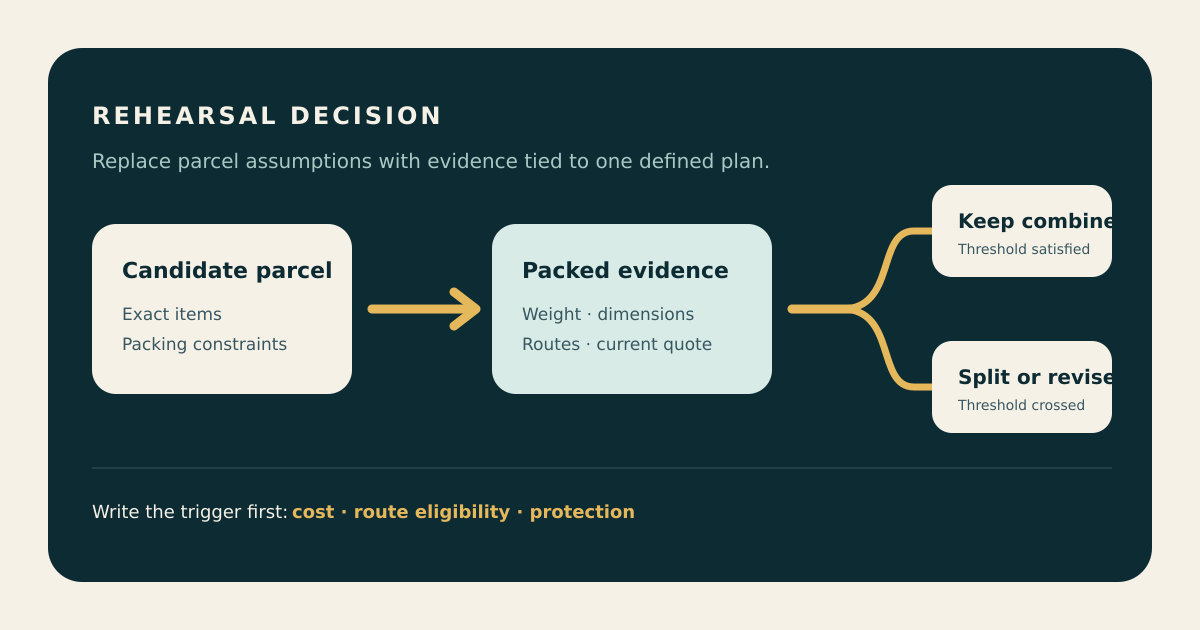
If the current account offers rehearsal or prepacking, read exactly what the service provides, what it costs and what decisions remain afterward. It can be useful when dimensions, box choices or a bulky mixed parcel make the preliminary quote uncertain. It does not automatically settle route eligibility, destination charges or the final payment.
Ask a focused question: what are the packed weight and outer dimensions under this specific instruction? Compare that result with the alternative you were considering. If you change the contents or packaging afterward, the earlier measurement may no longer describe the parcel. Keep the packing request and the reported result together.
Check the address without exposing private details
Review recipient name, country, city, postal code, street, building or house number, and any additional address field required by the current service. Use the destination’s actual address format. An apartment or unit entry should not silently replace the building number. Confirm that a saved address still belongs to the recipient and is suitable for this delivery.
If a field is unclear, ask support before submitting rather than inventing a placeholder. Enter any required recipient information in the official account, not in a public comment or shared QC image. This article does not need your address or identity details. Keep a private copy of the final address confirmation for your own records.
Compare eligible routes using the same package
Check that the selected route accepts the destination, goods, dimensions and weight of your actual parcel. Read what the price includes and any separate optional charges. Compare tracking, service conditions and the stated estimate as well as price. A short route name or someone else’s successful delivery does not establish eligibility for your shipment.
Use the current chargeable-weight rule and rounding when reconciling the amount. If no suitable route is shown, recheck the inputs and ask which characteristic is limiting the selection. Do not misdescribe the contents to make an option appear. For declarations or destination requirements, follow the applicable current official instructions and provide accurate information.
Review the final screen before payment
Make a final comparison between your inventory and the proposed parcel: quantities, retained packaging, requested protection, destination and route. Check currency, shipping amount, optional services and any credit or coupon actually applied. A displayed promotion may have conditions, so budget from the payable amount rather than a headline discount.
Save the confirmation and the relevant packing and quote details. If the amount differs from your earlier estimate, identify whether contents, dimensions, weight, route or options changed before proceeding. Do not click a payment button twice just because the first response is slow. Check the transaction status and official instructions before deciding that another attempt is needed.
Track the next stage with the right evidence
After submission, follow the parcel record and any instructions in the account. A tracking number can exist before a carrier records collection. Separate request creation, packing, payment, handover and carrier scans when reading the history. Delivery estimates can depend on a later event than the first submission, so keep the relevant timestamps.
If the status seems stuck, send support the parcel reference, last visible event and time, the action already completed, and the specific question you need answered. Use the official support channel for account details. Keep the payment record, QC evidence and parcel information until delivery and any follow-up are complete. The goal is a traceable shipment, not a collection of disconnected screenshots.