
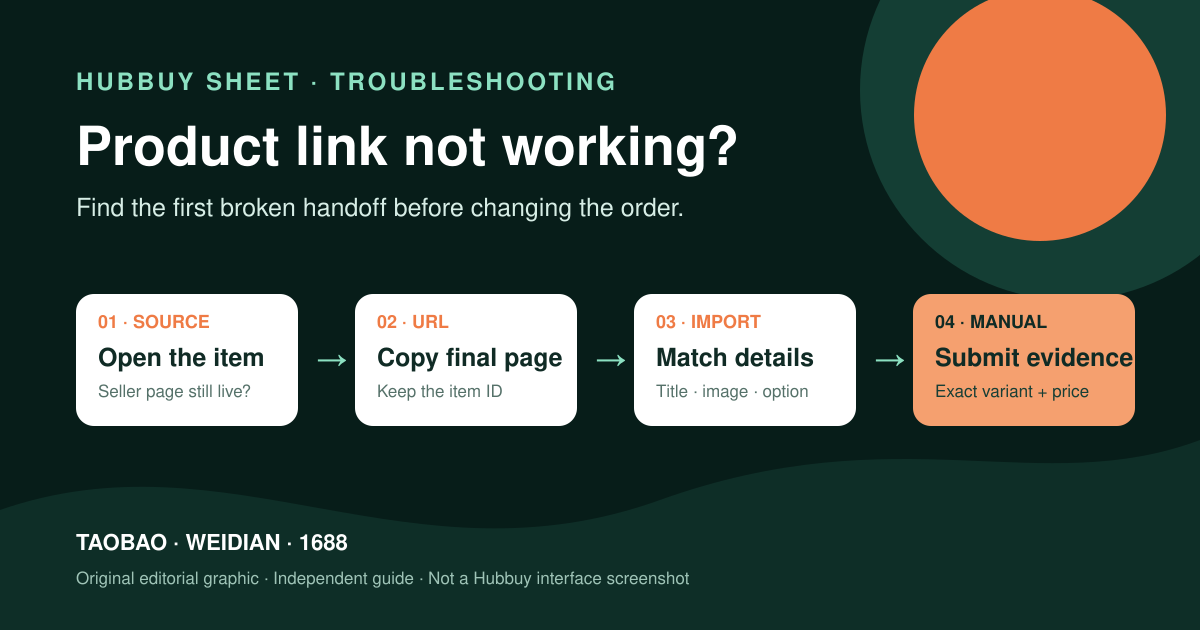
A broken product link is not one problem. The seller page may be gone, a mobile share address may hide the real destination, or Hubbuy may fail to import a page that still opens normally. The fastest fix is to identify which layer failed before changing the URL or entering an order manually.
Research note: Hubbuy’s public homepage currently invites shoppers to enter a product name or link and presents the service as a Taobao, 1688 and Weidian purchasing agent. It does not publish a permanent list of accepted URL formats, so this guide separates those official facts from independent troubleshooting.
Hubbuy supports link-led product search, but a link still has to identify a live item
The official Hubbuy homepage places a product-name-or-link search box at the start of the buying journey. Its public description identifies Hubbuy as a purchasing service for Taobao, 1688 and Weidian, while the visible purchase workflow says Hubbuy orders the item and the seller sends it to the warehouse.
That confirms the intended workflow, not that every shared address will import forever. Marketplaces use desktop, mobile and app-share pages; sellers also remove items. “The source does not open” and “Hubbuy does not import it” are different failures. Find which one happened before editing the address.
Find the first place where the chain breaks
Open the original link in a normal browser first. A removed, unrelated or error page cannot be restored by an agent. Treat a replacement seller link as a new sourcing decision, not the same item under a repaired address.
If login is required, record it. A page that works in your signed-in browser may expose less data to an importer. After any redirects, copy the final item-page address, paste it untouched into Hubbuy and compare the imported title, image, seller, price and options. The wrong variant is still a failed import.
Save the complete first URL in a note. If a cleaned version loses the product identifier, you can return to the evidence instead of guessing what the address used to contain.
Remove wrappers carefully; never remove the product identity
Remove copied commentary around the URL, open it, then copy the final item page. You may test a version without obvious analytics parameters, but preserve the original and never delete the item or offer identifier. Because an identifier can appear after a question mark, “delete everything after ?” can destroy a valid link.
Login gates, marketplace security checks and regional access can break the source-page layer even when an item still exists. Treat that as a diagnostic possibility, not a Hubbuy policy: confirm the marketplace page and the Hubbuy import result separately before deciding which layer failed.
- Prefer the final individual item page over a search result, shop homepage or social redirect.
- Keep the marketplace name, seller name and item identifier in your record.
- Do not use an image, spreadsheet row or agent card as a substitute for a source URL.
- Stop if the “fixed” address opens a different product or seller.
Save enough evidence to rebuild the order without relying on one link
Before payment, save the original URL, seller, item identifier, selected variant, quantity, visible price and China shipping. Add a screenshot of the exact option. A source link without the chosen size or color is incomplete evidence.
A January 2025 community guide reported difficulty recovering a raw source link from a Hubbuy-generated listing and advised saving it separately. This is one dated user report, not a current platform guarantee, but it shows why the source should survive outside the agent page.
Use Hubbuy’s current manual path without inventing missing details
Hubbuy’s public navigation currently exposes “Fill & Buy.” If a live source item will not import, use the current official interface or ask official support which route applies. Forms and charges can change, so this guide does not claim a permanent screen or fee.
Copy the seller’s variant wording, quantity, item price and China shipping evidence exactly. Pause when a field is unclear. Manual entry cannot make a dead listing safe; a replacement URL requires a new source check.
Resolve the wrong price or option before paying
Listings can show a low default price while another variant costs more; promotions and China shipping can also change the number. Compare the selected option before assuming the importer is wrong. Do not overwrite the price merely to match the cheapest figure.
If the image or option is wrong, return to the source or manual path. The complete Hubbuy purchase-research workflow also explains why product price and China shipping are separate from the later international parcel fee.
Check the submitted order, then reconnect it to warehouse QC
Compare the submitted order with your evidence: seller, option, quantity, item price and domestic shipping. Keep any message that changes the order. At warehouse arrival, use the saved option to spot a wrong color, label, quantity or model; the Hubbuy QC checklist covers visible checks.
Be cautious with link-extraction extensions. One Chrome Web Store listing updated in April 2025 claimed to recover original Hubbuy links but showed a very small user base and no ratings on 26 July 2026. That shows demand, not endorsement or a security review. Saving the source yourself is the safer default.
A cleaned URL may solve today’s import. The original source, selected option and submitted order together solve the larger problem: proving what you meant to buy after pages change.
Clear answers, without filling gaps with guesses
Why is my Taobao, Weidian or 1688 link not working in Hubbuy?
The source page may be unavailable, the copied address may be a mobile or share redirect, or the Hubbuy importer may not recognize that page format. Test the source page first, preserve its item identifier, then try the current official link-search or manual-order path.
Should I remove everything after the question mark in a product URL?
No. A product identifier can appear in the query string. Remove only clearly optional tracking parameters after saving the original URL, and never delete the value that identifies the item.
Can I submit a Hubbuy order when the product page does not import automatically?
Hubbuy's public navigation currently exposes a Fill & Buy entry. Use the current official interface or support instructions and copy the seller, item, variant, quantity, price and China shipping evidence exactly; this article does not assume a permanent form or fee.
Is an agent-generated product page a replacement for the original seller link?
No. It can be a useful transaction record, but the original seller page is better evidence for the seller, current variants and source listing. Save both when they are available.
The product-name-or-link search, Taobao/1688/Weidian purchasing description, staged order workflow and Fill & Buy navigation are public Hubbuy facts. URL cleaning, evidence files and troubleshooting order are independent editorial methods. Verified against the official Hubbuy homepage on 26 July 2026. Practical checklists are independent editorial guidance; live account terms remain the current source.
Ready to research a live product?
Use the catalog to find a lead, then confirm the individual seller listing before making a decision.
See the calculation, interface logic and exact official section
These additions separate three things that are often mixed together: what Hubbuy states publicly, the example used to explain a decision, and the live account data that must still be checked at transaction time.
The official policy labels visible in Hubbuy’s footer may lead to account-gated help content. This article does not claim that a login-only rule was independently verified from a public page. For transaction-specific restrictions, use the live order or parcel interface and current official support.